You
-
WAITING
0.00
- Final
- -
- TPS
- -
- Moves
- -
- Score
- -
Last move: -
-
Room ID - Players: 0/2
Click a player to watch their cube.
Hold Space. Release to start.
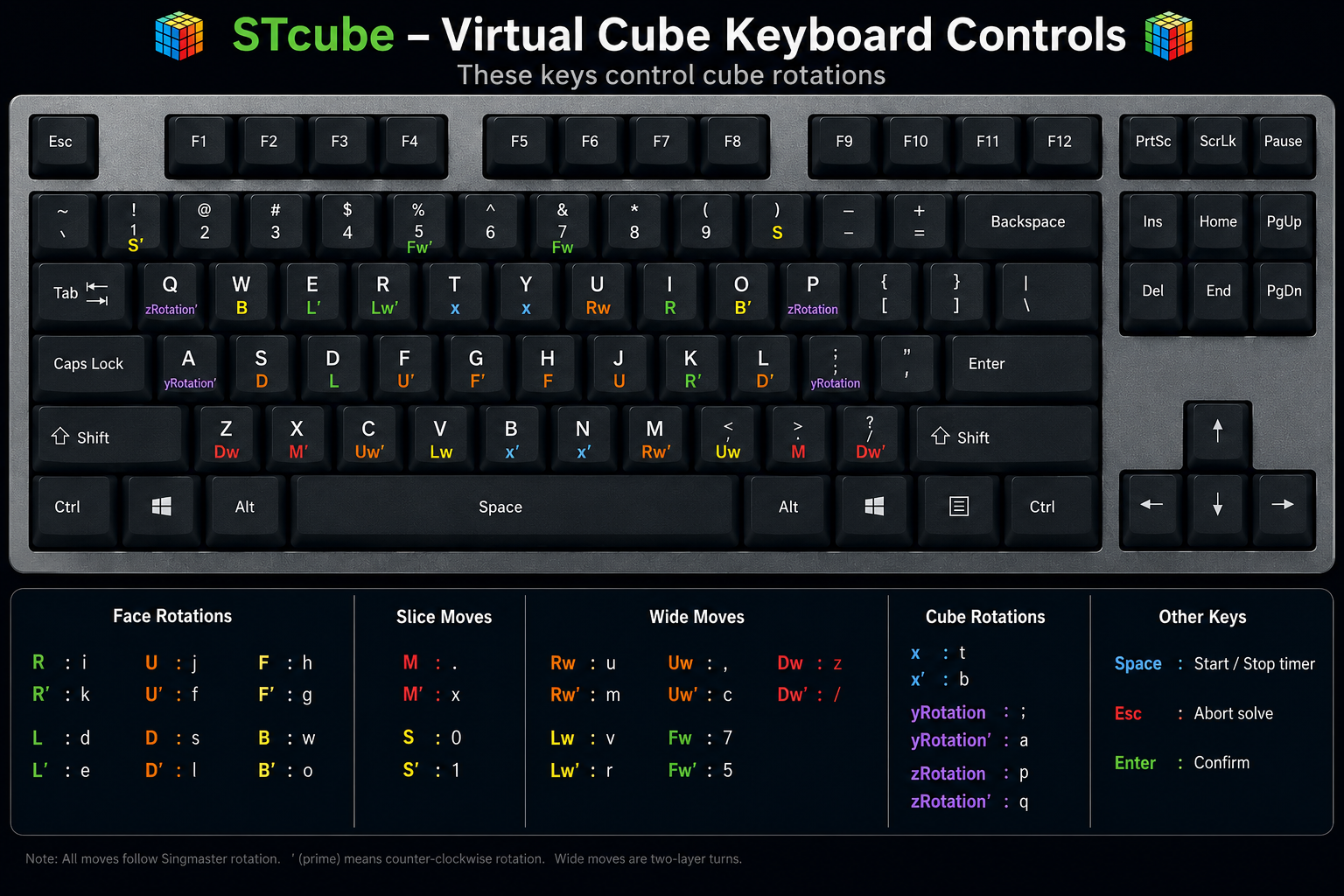
Space: generate a scramble and start inspection. Esc: abort the current solve. Keyboard controls follow a csTimer-style virtual cube layout.
Press Space to scramble. A 15-second inspection begins. Your first valid move starts the timer. x, y, and z rotations do not start it. The timer stops when the cube is solved.
Only valid solves are submitted. Suspicious solves are excluded. Log in to join the online rankings.
Friend Battle lets players solve the same virtual scramble together. The host starts each round with the players who are Ready. Ranked Battle matches another player automatically.
Keyboard shortcuts for every move are shown below.
You can also customize all key bindings anytime from the Settings menu.
Tip:
All keyboard shortcuts can be customized in Settings.